Last updated · Written and tested by the Seat Chart Generator team, who plan seating for real weddings, dinners and classrooms.
A seating chart generator turns a guest list into a table plan you can print. Seating 30 friends at a birthday dinner, or 150 guests at a wedding reception? Either way the job is the same: decide who sits together, keep a few people apart, fill every table and give the venue a chart they can follow. The tool above does all of it in your browser, for free, for up to 40 guests.
How to use the seating chart generator
- Pick a layout. Start from a dinner, reception or banquet layout, or add round and long tables yourself. Drag tables to match your room.
- Add your guest list. Paste names one per line or import a CSV. Add a group (family, friends, work) and a meal choice after a comma if you have them.
- Seat everyone. Drag names onto tables, or press Auto-seat. Households stay together, and rules like “keep Bob away from Sue” are respected.
- Print or share. Download a PDF with the floor plan, a list for every table and an alphabetical “find your seat” list for the entrance.
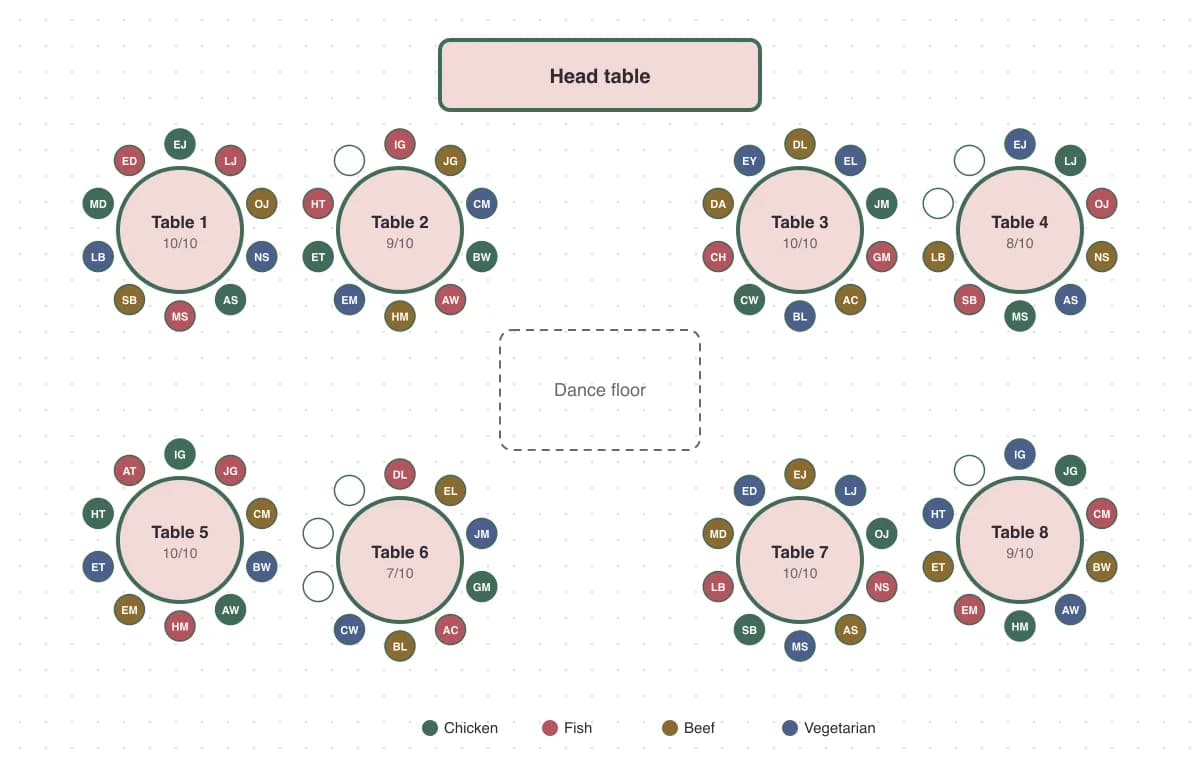
How many tables do you need?
Divide your guest count by the seats per table, then add one spare table for late RSVPs. Use this as a starting point:
| Table | Comfortable | Maximum | Tables for 100 guests |
|---|---|---|---|
| 60″ round | 8 | 10 | 13 |
| 72″ round | 10 | 12 | 10 |
| 6 ft banquet (rectangle) | 6 | 8 | 17 |
| 8 ft banquet (rectangle) | 8 | 10 | 13 |
Venues usually list their table sizes in the contract. Ask before you plan, so your seating chart matches the furniture you’ll actually get.
Who sits where: seating etiquette that avoids drama
- Start with the fixed seats. Place the hosts (or the couple), close family and anyone with mobility needs first, then build outwards.
- Seat people with at least two others they know. Mixing is fine, but nobody enjoys a table of strangers.
- Skip the “singles table”. Put single guests next to friends rather than in a group of their own.
- Keep older guests away from the speakers and closer to the exits and restrooms.
- Seat kids with their parents, or at a kids’ table near them if there are six or more children.
- Separate known conflicts quietly. Add a keep-apart rule and the generator handles it, with no awkward spreadsheet notes.
Seating chart generator vs. template vs. spreadsheet
| Feature | Seating chart generator | Printable template | Spreadsheet |
|---|---|---|---|
| Drag guests between tables | Yes | No, retype names | Cut and paste |
| Auto-seat with rules | Yes | No | No |
| Floor plan view | Yes | Fixed design | No |
| Last-minute RSVP changes | Seconds | Redo the design | Manual |
| Print-ready lists | Automatic | Manual | Manual formatting |
Templates look pretty but break the moment an RSVP changes. A generator keeps the guest list and the chart in one place, so a late “we’re bringing a plus-one” takes ten seconds. Planning a wedding? The wedding seating chart generator adds a head table, a planning timeline and printable place cards. Teachers can use the classroom seating chart generator for rows, pairs and random seating.
Common seating chart mistakes
- Finalising too early. Build a draft when RSVPs are 80% in, and lock it about a week before the event.
- Forgetting vendors and children. Photographers, DJs and babies in high chairs all take seats or space.
- Overfilling tables. A full table looks cosy on paper but feels cramped once chargers, centrepieces and elbows arrive.
- No alphabetical list. Guests scan for their own name, not their table. The PDF includes a “find your seat” list sorted by name.
- Losing track of meals. Add meal choices after each name so the caterer gets accurate counts per table.
Free vs. Event Pass
The free seating chart generator covers dinners, parties and classrooms of up to 40 people, including auto-seat and a printable PDF. For bigger events, the Event Pass is a single $19 payment (no subscription) for unlimited guests and rules, Excel import, watermark-free PDFs, place cards, escort cards, table numbers and a caterer meal summary.
Frequently asked questions
Is this seating chart generator really free?
Yes. The free plan seats up to 40 guests with unlimited tables, drag and drop, auto-seat, one seating rule and a PDF download with a light watermark. The optional Event Pass ($19 once, no subscription) adds unlimited guests, place cards, escort cards and watermark-free PDFs.
Do I need to create an account?
No. Open the page and start. Your chart saves automatically in your browser, so you can close the tab and come back on the same device.
Is my guest list private?
Yes. Names, imports and PDFs are all handled inside your browser. Your guest list is never uploaded to our servers.
How does auto-seating work?
It groups guests who share a group name (for example “Smith family”), fills tables from largest group to smallest, then moves people around to respect your keep-apart and keep-together rules. If a rule can’t be met, it tells you which pair to fix by hand.
How many guests fit at a round table?
A 60-inch round table seats 8 comfortably (10 if tight), and a 72-inch round seats 10 (up to 12). A 6-foot banquet table seats 6 to 8, and an 8-foot table seats 8 to 10.
Can I import my guest list from Excel or Google Sheets?
Yes. Download or save your sheet as a CSV and click Import. Columns named Name (or First/Last name), Group and Meal are detected automatically. Direct .xlsx import is included with the Event Pass.
Can I use it on my phone?
Yes. Tap a name, then tap a table to seat them, and drag tables with your finger. A laptop is easier for 100+ guests, but everything works on mobile.
What size should a printed seating chart be?
For a welcome-table display, 18×24 inches works for up to about 120 guests and 24×36 inches for larger events. The PDF is vector, so print shops can scale it up without blur.